


JGGL: AI Music & Video Maker
3.313.00 Reviews
App Specs
- Version
- 1.0.10
- Updated On
- License
- Free
- Downloads
- 50,000+
- Developer
- JGGL.AI
- Categories
- Music & Audio
- Platform
- Android
Screenshots
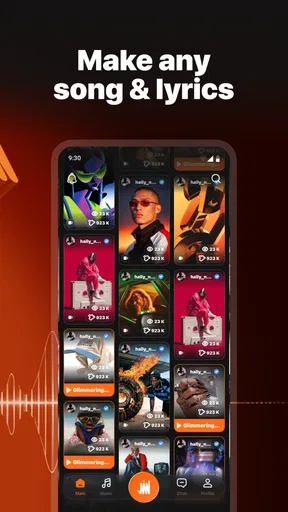
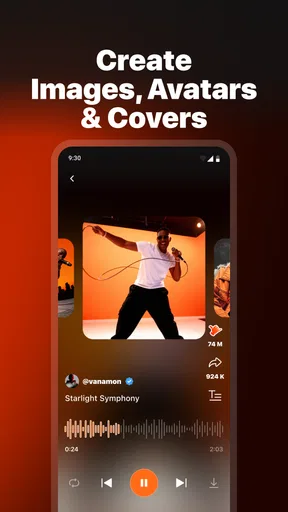
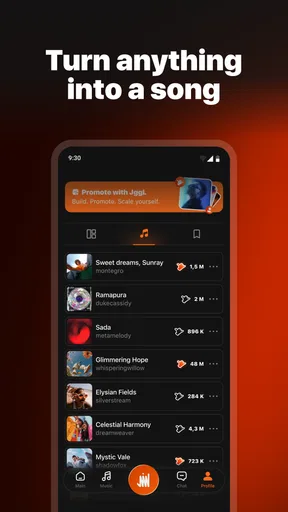
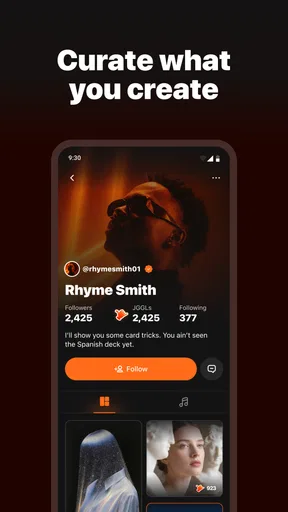
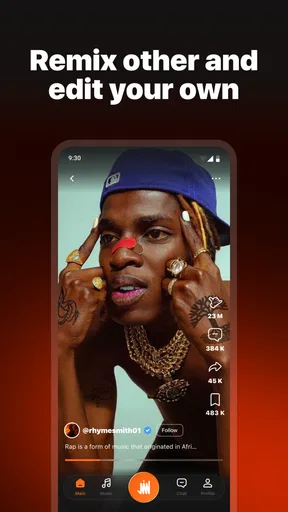
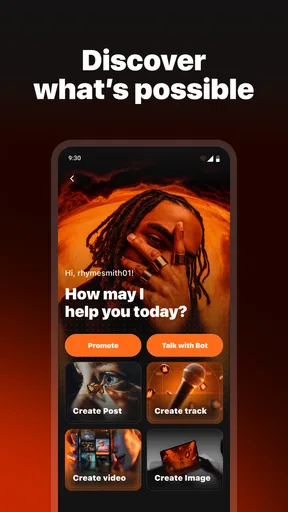
 Analysis by AppCompare
I approached JGGL: AI Music & Video Maker as a creative toolbox rather than a simple music player. It sits in the Music & Audio category, but its purpose reaches beyond listening: the store summary presents it as an AI content creator for music, video, images, and voice. That combination makes it interesting for anyone who wants to turn a rough idea into a shareable piece of media without moving between several separate apps.
My first impression was that the app is aimed at experimentation. You can arrive with a clear concept, such as a short background track for a travel clip, or with nothing more than a mood and a few words. The appeal is the possibility of using one creative starting point across different formats. The trade-off is that an AI creation app needs more patience than a conventional editor. The result depends heavily on how clearly you describe what you want, how you review the output, and how willing you are to try again.
JGGL.AI is the developer, and the app is free to install. It has passed the early discovery stage with over fifty thousand installs, although its average sits at 3.3 from a little over a hundred ratings. I read that combination as a useful warning rather than a reason to dismiss it: enough people have tried it to show interest, but the experience is not universally smooth. The current version is 1.0.10, and the app is intended for Teen users.
Where people usually get stuck
I’ve found that the first snag is often deciding what to ask for, not figuring out how to begin. This section looks at why broad prompts can produce disappointing results and how to separate a creative mismatch from a workflow problem. Once that distinction is clearer, it becomes easier to prepare the app and your idea before generating anything.
The creative brief is often too vague
The most common difficulty with an AI creator is not pressing the wrong button. It is asking for something so broad that the output has no clear direction. “Make a cool song” leaves too many choices open. A better starting point is to describe the purpose, mood, pace, subject, and intended format in ordinary language. For example, I would ask for a calm instrumental idea for a short evening video, with a warm atmosphere and a gentle ending.
This matters especially when the same project idea touches music, images, video, and voice. A description that works for a still image may be too abstract for an audio result. I found it more practical to treat each creation as a separate brief, even when I wanted the pieces to belong together. Keeping the mood consistent while changing the instructions for each medium produced a more coherent result than copying one prompt everywhere.
Expecting a finished production on the first attempt
JGGL is better understood as a sketching partner than as a replacement for a professional studio. An initial result can reveal a useful melody, visual direction, or narration concept, but it may still need selection and adjustment. I recommend judging the first generation for its strongest element instead of asking whether it is already publishable.
Worth Reading Before You Choose

Flipboard Shows What News Apps Must Do Beyond the Feed

Switching to Android Auto Means Rethinking Your Driving Routine

Google Calendar Makes a Crowded Week Easier to Manage

Ludo King Makes the Most of the Minutes Between Plans

Baby Panda World Brings Quick Play to Modern Phones, but Its Game Library Feels Busy

ESPN’s Live Game View Makes Following Close Games Easier
That approach also makes the app less frustrating. If the rhythm is promising but the atmosphere is wrong, revise the mood rather than abandoning the whole idea. If the image has the right subject but an unsuitable composition, narrow the visual instruction. Small changes are easier to evaluate than rewriting the entire request every time.
Mixed media creates a review problem
When an app can help with several types of content, it is easy to focus on the novelty and forget to check the basics. I would listen for abrupt changes in a music result, inspect the edges and text in an image, and watch a video from beginning to end instead of judging only its opening frame. Voice work deserves a separate check for pronunciation, pacing, and whether the tone suits the audience.
This is particularly important for content intended for other people. A result that feels impressive during a quick preview can become distracting when repeated in a longer clip. I found it useful to take a short break before reviewing an output again. That small pause makes repetitive phrasing, awkward timing, and visual inconsistencies easier to notice.
Setup checks before creating anything
A little planning can save a surprising amount of trial and error, especially when one project touches more than one kind of media. Here I focus on practical checks that help me start with a manageable test and keep creative expectations in line with the task. With that groundwork in place, the next section turns to what I do when a result or session goes off track.
Start with the platform requirements
The app supports Android 7.0 and newer, which covers a broad range of devices. Even so, compatibility is not the same as a guaranteed smooth session. AI creation can be more demanding than opening a basic audio app, particularly when a project involves several media types. Before blaming the app, I would close unnecessary background tasks, make sure the device has comfortable free storage, and use a stable connection.
The free installation makes it easy to test the workflow without committing money at the beginning. However, the app includes in-app purchases ranging from $1.09 to $599.99 per item. That is a very wide range, so I would pay close attention to every purchase screen and confirm what is being selected before accepting anything. Anyone sharing a device with children should also use the platform’s purchase controls, since the Teen content rating does not remove the need for supervision.
Prepare the idea outside the app
A small amount of preparation saves time. Before opening a creation screen, I write three short notes: what the content is for, what feeling it should create, and what should be avoided. For a social clip, I might note “quiet morning routine,” “soft and optimistic,” and “no dramatic build.” This gives me a consistent reference when the first result is close but not quite right.
I also decide whether I need a finished asset or only a starting point. If I need a polished commercial soundtrack, I would not rely on JGGL alone. If I need several directions for a personal project, a school presentation, or a private draft, the app becomes much more useful. Knowing that difference before starting prevents unrealistic expectations.
Keep the first test deliberately small
My preferred setup check is a modest trial rather than a large project. I begin with one simple idea and inspect the result before attempting a multi-part sequence. This helps separate a problem with the request from a problem with the session. It also avoids spending time refining a concept that does not fit the app’s creative behavior.
For a first session, I would create one piece, review it carefully, and note what changed after each revision. That record is more valuable than making several random attempts. It shows which wording improved the output and which changes made it less suitable. The method is especially helpful for newcomers who are still learning how specific their instructions need to be.
Use the app with a clear content boundary
Because the app can work across music, video, images, and voice, I would decide in advance what belongs inside the project and what should be completed elsewhere. A sensible division might be using JGGL for ideation and rough assets, then using a familiar editor for exact timing, captions, trimming, or final arrangement. This is not a weakness unique to the app; it is a practical way to combine generative tools with precise editing.
The result is a more controlled workflow. JGGL can help me move past a blank page, while a conventional editor gives me the frame-by-frame or track-by-track control that AI creation tools generally do not prioritize. Users who need exact production control from the very first step may be happier starting with that conventional editor instead.
Recovering when a workflow goes wrong
When an output misses the mark, changing everything at once usually makes it harder to tell what went wrong. I’ll cover a calmer way to revise, retry, and preserve useful parts of an experiment without treating every imperfect result as wasted effort. Sometimes, though, the cause sits outside the creative workflow, which is worth checking before trying again.
When an output is close but unusable
I would not immediately delete a disappointing result. First, I identify the single biggest issue. If the music has the right energy but feels too busy, I simplify the instruction. If the voice sounds unsuitable, I clarify the intended audience and delivery style. If the visual result is cluttered, I reduce the number of requested elements instead of adding more detail.
This “one change at a time” method is one of the most useful habits I found. Changing mood, subject, length, and style simultaneously makes it impossible to know what helped. A controlled revision may feel slower, but it produces clearer progress and reduces the temptation to spend endlessly on random generations.
When a creation appears incomplete
If a result seems to stop early, load incorrectly, or fail to appear as expected, I first check the connection and give the session a moment before repeating the request. I would then close and reopen the app, retry with a simpler prompt, and avoid submitting several identical requests in quick succession. These are basic steps, but they often distinguish a temporary session problem from a genuine issue with the idea.
I would also keep the original wording in a note before retrying. That makes it possible to compare the attempts and prevents a recovery process from turning into guesswork. If the simpler test works, I would add complexity gradually. If even the simple test fails repeatedly, the problem may be environmental rather than creative.
Protecting work during experimentation
AI workflows encourage repeated attempts, so I recommend saving or exporting any result that is genuinely useful as soon as the app makes that possible. I would not assume that a favorite version will remain easy to recreate from memory. Keeping a short label for each attempt, such as “warmer,” “less busy,” or “better opening,” also makes later selection much easier.
This is a non-obvious advantage of treating the app like a sketchbook. The value may be distributed across several attempts: one version may have the best opening, another the strongest image idea, and a third the most suitable voice direction. Even if I finish the project elsewhere, those fragments can guide the final edit.
Do not confuse generation with editing
A frequent recovery mistake is trying to force the app to solve a precise editing problem through a new generation. If I need an exact cut, a fixed caption position, or a carefully timed transition, I would stop regenerating and move to an editor designed for that job. Repeatedly asking for a new result may produce something different, but not necessarily something more controllable.
JGGL is most helpful at the stage where I need possibilities. It is less suitable when the creative decision has already been made and I simply need accurate execution. Recognizing that boundary saves both time and any unnecessary purchase attempts.
When the app is not the cause
A disappointing session does not automatically mean the app itself is at fault: device conditions, connectivity, and unclear instructions can all shape what happens. This section helps me check those possibilities without assuming a technical issue or blaming the prompt prematurely. After separating those causes, I can make a more grounded judgment about whether the tool fits my needs.
Device and connection conditions
Not every delay or failed result points to a flaw in the app. A crowded device, unstable network, aggressive battery management, or limited available storage can affect a creation session. I would test the same basic workflow after closing other demanding apps and moving to a more reliable connection before reaching a conclusion.
The test should be simple and repeatable. Use one short idea, wait for the result, and then try one controlled revision. If the app behaves consistently under those conditions, the earlier trouble may have been caused by the surrounding setup. If the same failure continues, documenting the steps and the device environment would make any support request more useful.
Prompt quality can look like a technical failure
Sometimes the app is working exactly as requested, but the request leaves too much room for interpretation. If every result is technically complete yet consistently misses the intended mood, I would rewrite the brief instead of reinstalling. Mention the subject first, then the desired feeling, the format, and the elements that should not dominate.
I also avoid contradictory instructions. Asking for something both energetic and peaceful can be valid, but it needs context: perhaps a calm opening followed by a brighter middle. Without that relationship, the output may feel unfocused. Clear sequencing is especially helpful when the idea involves video or voice rather than a single static image.
Creative expectations may be the real mismatch
Some users want an immediate, repeatable result that sounds exactly the same every time. Others enjoy variation and discovery. JGGL is more naturally suited to the second group. Its appeal lies in exploring directions quickly, while its limitation is that exploration can require selection and cleanup.
If I were producing a client project with strict brand rules, exact vocal delivery, or a fixed musical identity, I would use JGGL only for early concepts unless its output met those requirements after careful testing. For personal experiments, mood boards, short drafts, and idea generation, the same flexibility feels like a strength rather than a problem.
A realistic everyday scenario
Imagine I have recorded a short video of a weekend market and want a gentle soundtrack, a cover image, and a brief spoken introduction. I would begin by describing the atmosphere and audience, then create a music direction without demanding a complete final track. Next, I would request a visual concept that matches the market’s colors and relaxed mood, and finally prepare a concise voice idea.
After reviewing each result separately, I would choose the strongest pieces and assemble them in an editor where timing can be controlled precisely. If the voice is too formal, I would revise only that instruction. If the music competes with speech, I would look for a quieter variation rather than changing the entire project. This workflow uses the app for what it does best while avoiding the expectation that one generation should solve every production detail.
My practical verdict after using it
My verdict depends less on the promise of making many kinds of content and more on whether the workflow suits the person using it. I’ll weigh where the free entry point is useful, where purchase caution matters, and when a specialist editor is a better fit. That leaves a practical choice: try it for guided exploration, or skip it if precision is the priority.
Who will get the most from it
I would recommend JGGL to curious creators who want to explore several media formats from one starting point. It is a sensible option for someone making personal videos, visual concepts, short audio experiments, or early drafts and who enjoys refining ideas through conversation-like instructions. The free entry point also makes it approachable for a first trial, provided the purchase screens are treated carefully.
It may also help people who regularly face a blank page. Instead of waiting for a complete idea, I can use the app to generate a direction and then respond to it. That back-and-forth is more valuable than expecting a perfect answer. The strongest user is patient, specific, and comfortable choosing among imperfect alternatives.
Who should choose another tool
I would skip it as a primary production environment if I needed professional-level consistency, exact editing controls, or a predictable result with minimal experimentation. A dedicated audio workstation is better for detailed mixing, while a traditional video editor is better for precise cuts and timelines. A specialized image tool may also be preferable when composition and retouching matter more than rapid ideation.
I would also be cautious if unexpected spending would be a serious concern. The app is free to install, but its in-app purchase range is broad enough that I would never tap through a payment screen casually. The Teen rating is another reason for families to set clear rules around creative content and purchases before handing over the device.
How it compares with familiar alternatives
Compared with a standard music app, JGGL is not designed around discovering or streaming a finished catalog. Its role is active creation. Compared with a conventional editor, it offers a faster route from an empty idea to a rough asset, but less certainty over exact details. Compared with using separate AI tools for music, imagery, video, and voice, its attraction is the convenience of keeping the exploration in one place.
That convenience has a cost: a multi-purpose app may not offer the depth of a specialist tool in every medium. I see JGGL as a front door to creative work, not the entire house. It is particularly useful when I need options quickly, then want to refine the best option with tools built for accuracy.
What I would do before recommending it
I would start with a small, low-stakes project, write a focused brief, and test one medium at a time. I would avoid making a purchase until I understood the workflow and had checked exactly what any paid action involved. I would also keep copies of promising results and use an external editor for final timing or cleanup.
The app’s 3.3 average from roughly a hundred ratings suggests that expectations should be realistic. I would not install it expecting a flawless one-tap studio. I would install it because the combination of music, video, images, and voice can make early experimentation more convenient, especially when I am willing to guide the process and judge the results critically.
My final view is positive but measured. JGGL: AI Music & Video Maker is most valuable as a practical idea generator, not an automatic replacement for every creative tool. If you enjoy trying variations and can tolerate some workflow friction, it can help turn a vague concept into something tangible. If your priority is precision, repeatability, or a fully controlled final production, I would use a specialist alternative and keep JGGL for brainstorming.
Pros
- Creates music and videos quickly with AI-assisted tools.
- Useful for experimenting with original song and video ideas.
- Combines audio and visual creation in one mobile app.
- Can help beginners produce content without advanced editing skills.
- Suitable for social media creators needing fast creative drafts.
Cons
- AI results may vary and require several attempts to sound polished.
- Advanced users may find editing and customization options limited.
- Generated content can feel repetitive without detailed user input.
- Export quality
- formats
- or watermarks may depend on the plan.
- Some features may require an internet connection and account access.
FAQs for JGGL: AI Music & Video Maker
What is JGGL: AI Music & Video Maker used for?
JGGL: AI Music & Video Maker is designed for creating music and short videos with the help of artificial intelligence. After exploring the app, its main appeal is the ability to turn ideas, prompts, images, or creative concepts into shareable content without requiring advanced editing skills. It may be useful for social media posts, music experiments, visual projects, and quick creative drafts.
Can beginners use JGGL without previous music or video editing experience?
Yes, the app is aimed largely at beginners and casual creators. Its AI-focused workflow can simplify tasks that would normally require separate audio and video tools, such as generating a musical idea, matching visuals, or preparing content for sharing. However, users who want detailed control over arrangements, mixing, transitions, or professional exports may need to spend time learning the available settings.
Is JGGL: AI Music & Video Maker free to download and use?
JGGL may be available to download at no initial cost, but the exact free features can depend on the current version, platform, region, and account status. AI generation, premium templates, higher-quality exports, additional styles, or removing branding may require in-app purchases or a subscription. Before creating a large project, check the app-store listing and its payment terms carefully.
Does JGGL require an internet connection to generate music and videos?
Because AI generation commonly relies on cloud-based processing, an active internet connection is likely needed for many of JGGL’s main functions. Offline access may be limited to viewing saved projects or using certain locally available tools. Performance can also vary with connection quality, and longer or more complex generations may take additional time while the app processes the request.
Are videos and music created with JGGL safe to publish commercially?
Users should review JGGL’s current terms of service, licensing rules, and the conditions attached to any music, images, voices, templates, or AI-generated assets before using them commercially. AI output may also resemble existing styles or content, so it is wise to avoid copyrighted lyrics, trademarks, or recognizable artists’ identities. For business use, confirm the license for the specific export and subscription plan.


